 spa77 NetworkMinecraft server network
「ゆけむりらんど!」 (Yukemuri Land!) guideHow to Play
How to Play
Illustrations and screenshots may show Japanese labels. The text below explains the same features in English.
Choose a game in the lobby and join its queue. Once enough players have gathered, a countdown runs and the match starts. This page walks you through everything from the lobby to what happens after a match.
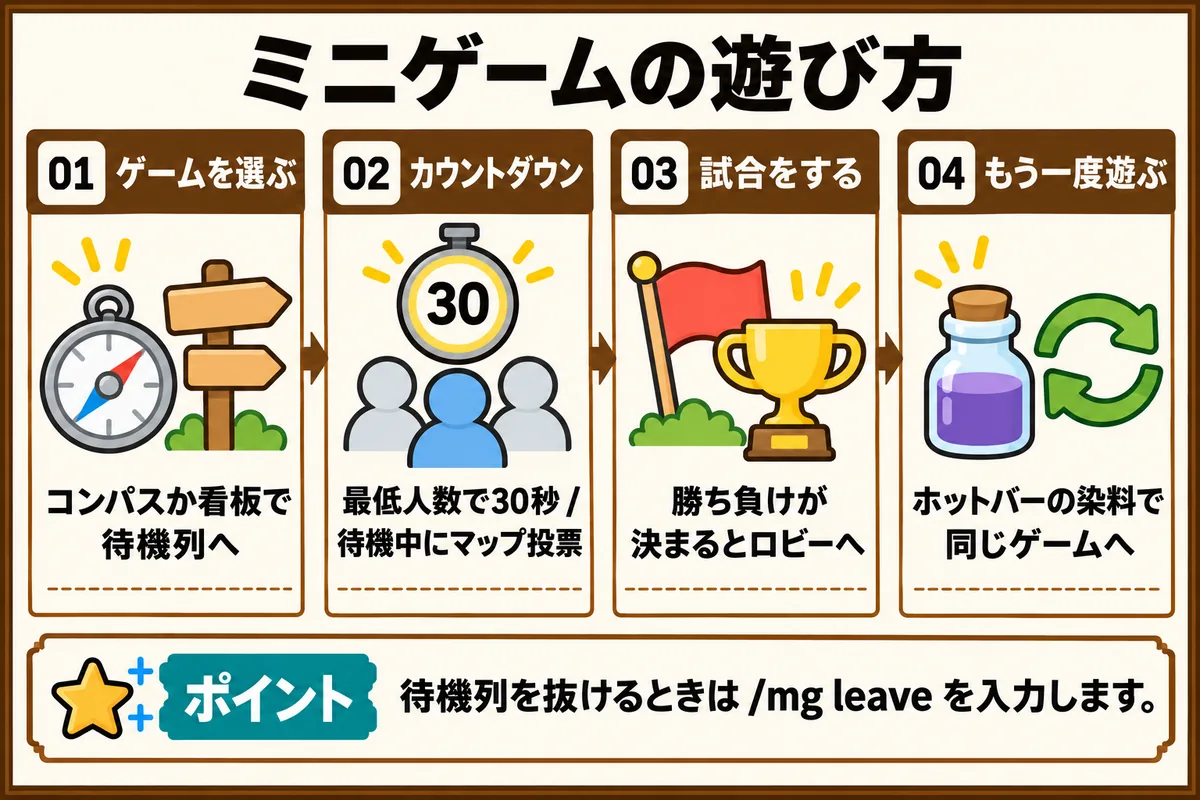
Choose a game in the lobby
When you enter the minigame server, you are moved to the lobby and given a 「ゲームを選ぶ」 (Choose a game) compass.
Choose with the compass
Right-click the compass to open the game list menu. Click the icon of the game you want to play to join its queue.
Choose with a sign
The lobby has a booth for each game. You can also join a game’s queue by right-clicking the sign at the entrance of its booth.
Reading the nameplate above a sign
Above each sign, a floating nameplate shows the game name, the number of waiting players, and the status. It updates every second while there are players in the lobby.
- Waiting players: shows the number of players gathered and how many more are needed to start, such as 「待機 2/16人 (あと1人で開始)」 (Waiting 2/16 players (1 more to start))
- Status: shows one of 「あと20秒で開始」 (Starts in 20 seconds), 「試合中 | 残り 1:23 | 生存 4人」 (In match | 1:23 left | 4 alive), or 「試合の空き待ち」 (Waiting for a free match slot)
Parkour
There is a parkour course on the north side of the lobby. Step on the gold pressure plate to start the timer, and step on the iron pressure plate to finish.
The queue and the countdown
When the number of players in the queue reaches the minimum, a 30-second countdown starts. The remaining time appears on the action bar and as a title.
- When the queue reaches the maximum number of players, the remaining time is cut to 10 seconds
- If the number of players drops below the minimum, the countdown is canceled
- If everyone on the server is in the same queue, the match starts right away without waiting for the timer
- Sound effects play during the last 10 seconds
To leave the queue, enter /mg leave.
Hotbar items
The lobby hotbar holds the items you use to control things. Use each one by right-clicking, and none of them can be moved or dropped.
| Item | Slot | What it does |
|---|---|---|
| 「ゲームを選ぶ」 (Choose a game) compass | 5th | Opens the game list |
| 「パーティー」 (Party) player head | 6th | Opens the party menu |
| 「マップ投票」 (Map vote) map | 7th | Opens the voting menu (only while you are in a queue) |
| 「キットを選ぶ」 (Choose a kit) iron sword | 8th | Opens the kit menu (only while you are in the queue of a game that has kits) |
The 「もう一度遊ぶ」 (Play again) dye is explained in the Play again section below.
Everything can be done through chest menus or right-clicks, so you can play on Bedrock Edition too.
Play with a party
When you form a party, you can join a queue together with your friends. A party holds up to 8 players.
Invite someone to your party
Use /party invite <name> to invite someone. If a player who is not in a party sends an invite, a party with that player as the leader is created. When you are already in a party, only the leader can invite.
An invitation expires after 60 seconds. Both the inviter and the invited player are told about it. If nobody accepts, a party of one is not left behind.
Accept an invitation
When you are invited, you are told with a title and a sound effect.
- Java Edition: click 「[参加する]」 ([Join]) or 「[断る]」 ([Decline]) in the chat
- Bedrock Edition: do the same from the 「パーティー」 (Party) item in the hotbar
With commands, use /party accept [name] to accept and /party deny [name] to decline. If you omit the name, the latest invitation is used.
If you are already in another party, leave it with /party leave first and then join.
The party menu
Right-click the 「パーティー」 (Party) item in the hotbar to open the menu.
- Invitations you received: the head of the inviter appears, with 「参加する」 (Join, green wool) and 「断る」 (Decline, red wool)
- Members: the heads of the members appear, and the leader is marked
- Invite: the heads of online players who are not in a party appear. You can flip through pages
- Leave: leaves the party
- Disband: shown to the leader only
When the leader clicks a member’s head, a confirmation menu with 「外す」 (Remove), 「リーダーを渡す」 (Make leader), and 「戻る」 (Back) opens.
Join a queue together
In a party of 2 or more, only the leader can join a queue. When the leader joins, all online members join the same queue together.
In the following cases, nobody joins and you are told the reason. Either everyone joins or no one does.
- A member is in a match: the leader is told who is in a match
- The party has more players than the game’s maximum
- The queue does not have enough free spots
A member who is spectating stops spectating, returns to the lobby, and joins with the others.
When the leader leaves the queue with /mg leave, the whole party leaves. When a member leaves, only that member leaves, and the party is told.
In team games, players from the same party are placed on the same team as much as possible. The difference in team sizes still stays within 1 player.
Leave, remove, or hand over leadership
You can manage the party with these commands.
/party leave: leave the party/party kick <name>: remove a member (leader only)/party transfer <name>: hand over leadership (leader only)/party disband: disband the party (leader only)
If the leader leaves or logs out, the member who has been in the party the longest becomes the new leader. When only one player is left, the party is disbanded. Invitations sent to or from a player who logged out disappear.
Joining, leaving, removal, a change of leader, disbanding, and expired invitations are announced in chat to everyone involved.
Party chat
Use /party chat <message> or /pc <message> to send a chat that only party members can see. You can see the members with /party list.
All commands are listed in Commands.
Map voting
While you are in a queue for a game with map voting, you are given a 「マップ投票」 (Map vote) map in your hotbar. Right-click it to see the options and the current vote counts, then click to vote. If you choose 「おまかせ」 (Random), no vote is cast.
The games you can vote in and their options are as follows.
| Game | Options |
|---|---|
| Round PvP | Outdoor, city |
| Gun Fight | Outdoor, city |
| Bed Wars | 6 island themes |
How to vote
Each player has 1 vote, and you can change it as often as you like while you are in the queue. The confirmation of your vote is shown only to you. The current leader is shown on the action bar of everyone in the queue, like 「| 投票1位: 市街地」 (| Leading vote: City).
When you leave the queue, the 「マップ投票」 (Map vote) item is taken back and your vote disappears.
How the result is decided
When the match starts, only the votes of that match’s players are counted. The option with the most votes is chosen, and a tie is decided at random. If there are no votes at all, the choice is random.
The result is announced to the players, like 「マップ投票の結果: 市街地(3票)」 (Map vote result: City (3 votes)).
Kit selection
While you are in a queue for a game with kits, you are given a 「キットを選ぶ」 (Choose a kit) iron sword in your hotbar. Right-click it to open the menu. The kit you have chosen has an enchantment glint.
For now, the only kits are the Round PvP classes (Swordsman, Archer, Cleric). If you choose 「ランダム」 (Random), the game picks for you.
The kit you choose is carried over to the next time you play. When the match starts, your class is told in chat. If you did not choose one, it is assigned at random.
When you leave the queue, the 「キットを選ぶ」 (Choose a kit) item is taken back.
What you see during a match
During a match, information appears at the top of your screen.
Boss bar
The boss bar for players and spectators shows the game’s status, such as time left, number of players alive, the round, and the top score. The bar shrinks as time runs out, turning pink when less than half is left and red when less than 20% is left. The same text also appears on the nameplate at the lobby booth.
When a player is eliminated
When a player is eliminated, everyone in the match sees a title like 「◯◯ 脱落 / 残り N 人」 (◯◯ eliminated / N left). A bell sounds when 3 or fewer players are left, and 「一騎打ち」 (Duel) appears when 2 are left. If that elimination decides the match, the win/loss display appears instead.
In Block Hide-and-Seek, the same display appears when a hider is found.
When the result is decided
Winners see the 「優勝!」 (Victory!) title, and 4 fireworks go off around them. Everyone else sees a title like 「◯◯ の勝ち」 (◯◯ wins), or 「引き分け」 (Draw) for a tie. Fireworks do not damage you.
Win streak announcements
If you win the same game two or more times in a row, the whole server is told in chat at the end of the match. When a player on a win streak joins a match, the other participants are told when it starts.
Play again
When a match ends and you return to the lobby, you receive a dye named 「もう一度遊ぶ(ゲーム名)」 (Play again (game name)) in the fourth hotbar slot. Right-click it to join the queue of the same game right away.
The dye is given to every player in the match when it ends. This includes players who were eliminated and then spectated. It is not given to players who left the match partway with /mg leave, players who logged out, or players who only spectated without playing.
You can also join by clicking 「[もう一度遊ぶ]」 ([Play again]) in the chat (Bedrock Edition players use the dye). This dye cannot be moved or dropped.
Spectate a match
You can watch a match in progress even if you are not playing in it.
How to start spectating
In the compass menu, click the Eye of Ender that appears under a game. The Eye of Ender only appears when a match is in progress. With commands, use /mg spectate [game ID]. It cannot be used while you are in a queue.
What you see while spectating
While spectating, each player’s HP is shown under their name. This is also true after you have been eliminated. If you click a player to jump into their view, their HP also appears on your action bar. HP is only shown on the screen of the person spectating.
Stop spectating
Enter /mg leave to return to the lobby.
Stats and rankings
You can check your own stats with /mg stats and the rankings with /mg top.
Stats
/mg stats shows your plays, wins, win rate, and best win streak for each game. Add a name to see another player’s stats. A match that starts with only one player is not counted in stats, win streaks, or rankings.
Rankings
/mg top shows the top 10 players by wins. Add a game ID to see the ranking for that game only.
On the monument behind the fountain in the lobby, the top 5 players by total wins across all games are displayed.
For how to use commands, see Commands.