 spa77.works SMPEconomy survival
Player guideMaintenance and connection problems
Maintenance and connection problems
Illustrations and screenshots may show Japanese labels. The text below explains the same features in English.
This page lists scheduled server downtime and what to check if you cannot connect.
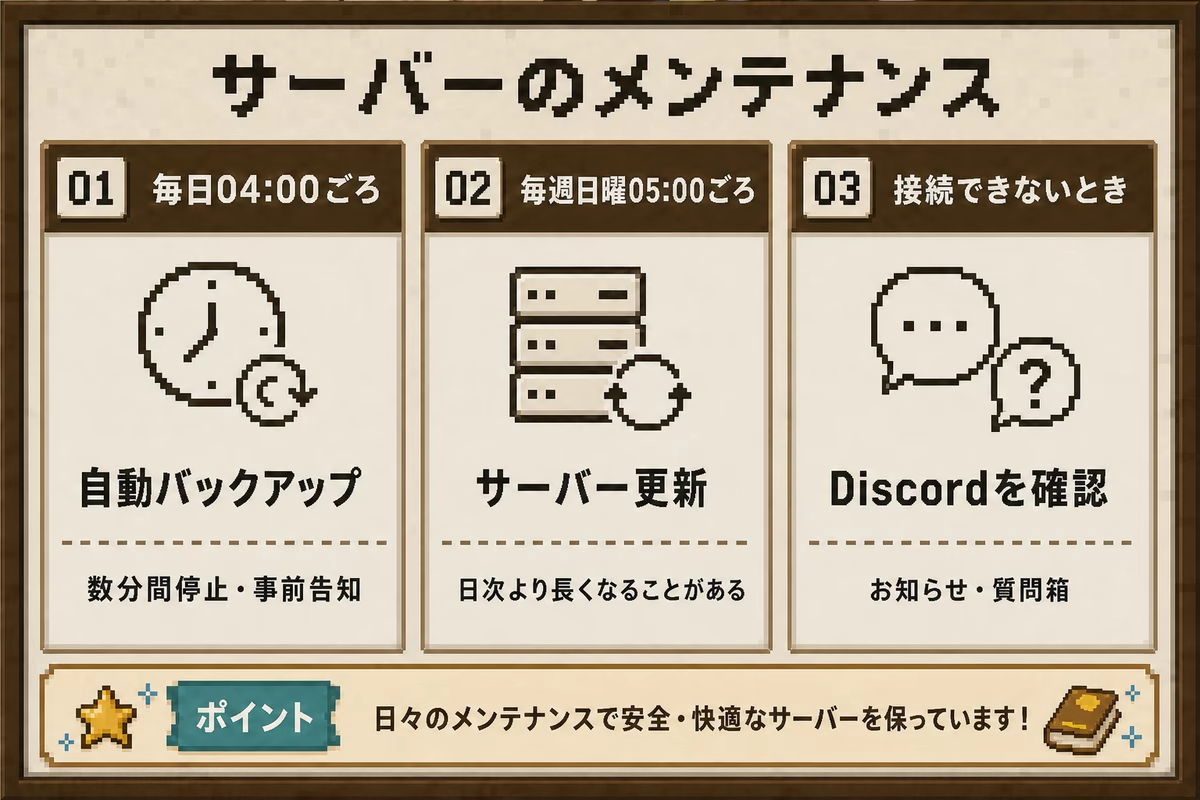
Daily automatic backups
Announcements and backup preparation start around 04:00 every day (Japan Standard Time, JST). The server stops a few minutes later, usually for a few minutes.
Several advance warnings appear in game chat. The exact start time and downtime can vary with update preparation and the amount of data to back up. When a warning appears, finish what you are doing somewhere safe and log out. An unexpected disconnection just before shutdown can cause problems. You cannot connect while the server is stopped.
Weekly server updates
Scheduled maintenance for software updates starts around 05:00 every Sunday (JST). This can take longer than the daily backup.
If you cannot connect on Sunday morning, this maintenance may be in progress.
Monthly host updates
The computer running the server is updated around 06:30 on the first day of each month (JST). If those updates require a restart, the Minecraft server is unavailable for a few minutes to about 15 minutes. There is no downtime when a restart is unnecessary.
Players receive in-game warnings starting 3 minutes before shutdown. Data is saved using the same procedure as the daily backup. If the first day of the month is a Sunday, the update waits for the Resource End and Resource Server 2 resets and scheduled maintenance to finish.
If you cannot connect
- First check whether it is one of the times above: around 04:00 daily, 05:00 on Sundays, or 06:30 on the first day of the month, all in JST.
- Java Edition requires Minecraft 26.2 or later. Check that you have not selected an older version in the launcher.
- Update Bedrock Edition to the latest available game version.
- If you cannot connect outside these times, check the announcements on Discord or ask in the Discord question channel.