 spa77.works SMPEconomy survival
Player guidePosters
Posters
Illustrations and screenshots may show Japanese labels. The text below explains the same features in English.
Choose a poster to decorate a wall in your home or shop. Posters are free, and you can collect them as many times as you like.
All current posters are 2 blocks high and 2 blocks wide. Each picture is divided into 4 maps. Place them in item frames to assemble the poster.
Poster ideas are welcome
Send your ideas to staff using /feedback <message> or Discord.
What you need
Prepare these 3 things.
4 item frames
Supply your own item frames. Both ordinary and glow item frames work.
A flat wall at least 2 blocks high and 2 blocks wide
All 4 frames must face the same direction on a flat wall.
4 empty inventory slots
You need these to receive the maps.
Putting up a poster
Once everything is ready, follow these 3 steps.
1. Choose a poster with /poster
Enter this command in chat.
/posterThe poster list opens. Left-click the poster you want to receive its 4 maps in your inventory.
If you are asked to make space
You cannot receive the maps with a full inventory. Clear 4 slots, then choose the poster again with /poster.
Available posters: 8 designs
- ネコと和解せよ (Make Peace with Cats)
- エメラルドは計画的に (Use Emeralds Wisely)
- 村人は神様です (Villagers Are Our Gods)
- 溶岩用心 (Beware of Lava)
- あなたのダイヤが必要です (We Need Your Diamonds)
- 自動化トラップ ダメ絶対 (No Automatic Traps): angry villagers call for a ban on fully automatic traps. See Automation.
- 従業員募集 (Help Wanted): a villager in a suit stands against a yellow background.
- spaの溶岩チキン (spa’s Lava Chicken): chicken roasts on a skewer over lava.
2. Arrange 4 item frames on the wall
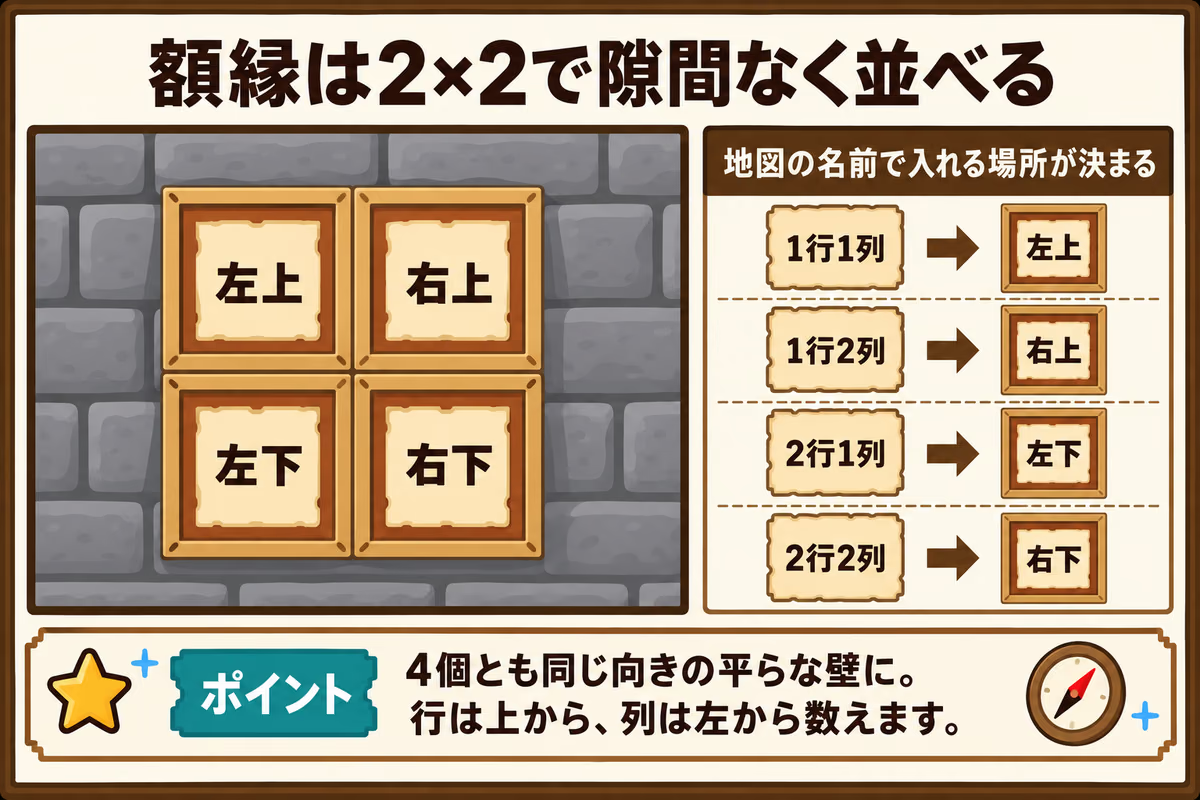
Hold an item frame and right-click the wall. Arrange the frames together with no gaps, as shown below.
Choose an allowed location
Use your own build or a place where you have permission to place items. You cannot place posters where land protection or other restrictions prevent it.
3. Match each map’s name to its position
Hover over a map to see a label such as 「1行1列」 at the end of its name.
「行」 means the row counted from the top. 「列」 means the column counted from the left.
| Map label | Position |
|---|---|
| 1行1列 | Top left |
| 1行2列 | Top right |
| 2行1列 | Bottom left |
| 2行2列 | Bottom right |
Hold each map and right-click the matching empty frame. The poster is complete when all 4 pieces line up.
If the picture does not line up
First check that each map’s row and column match its frame position.
If the position is correct but the picture is tilted or upside down, the map has been rotated inside its frame. A newly placed map starts in its original orientation. Each right-click on an occupied frame rotates it. Turn it until it lines up with the surrounding pieces.
Removing, moving, or collecting more posters
You can take down a poster, move it elsewhere, or collect another copy after placing it.
Removing or moving a poster
In survival mode, left-click a map in its frame to remove it. Pick up the dropped map to place it somewhere else.
Getting another copy
If you lose a map or want the same poster in another location, collect another set through /poster.
Command reference
| Command | What it does |
|---|---|
/poster |
Open the poster selection menu and receive the 4 maps for the chosen poster |