 spa77.works SMPEconomy survival
Player guideWorlds and travel
Worlds and travel
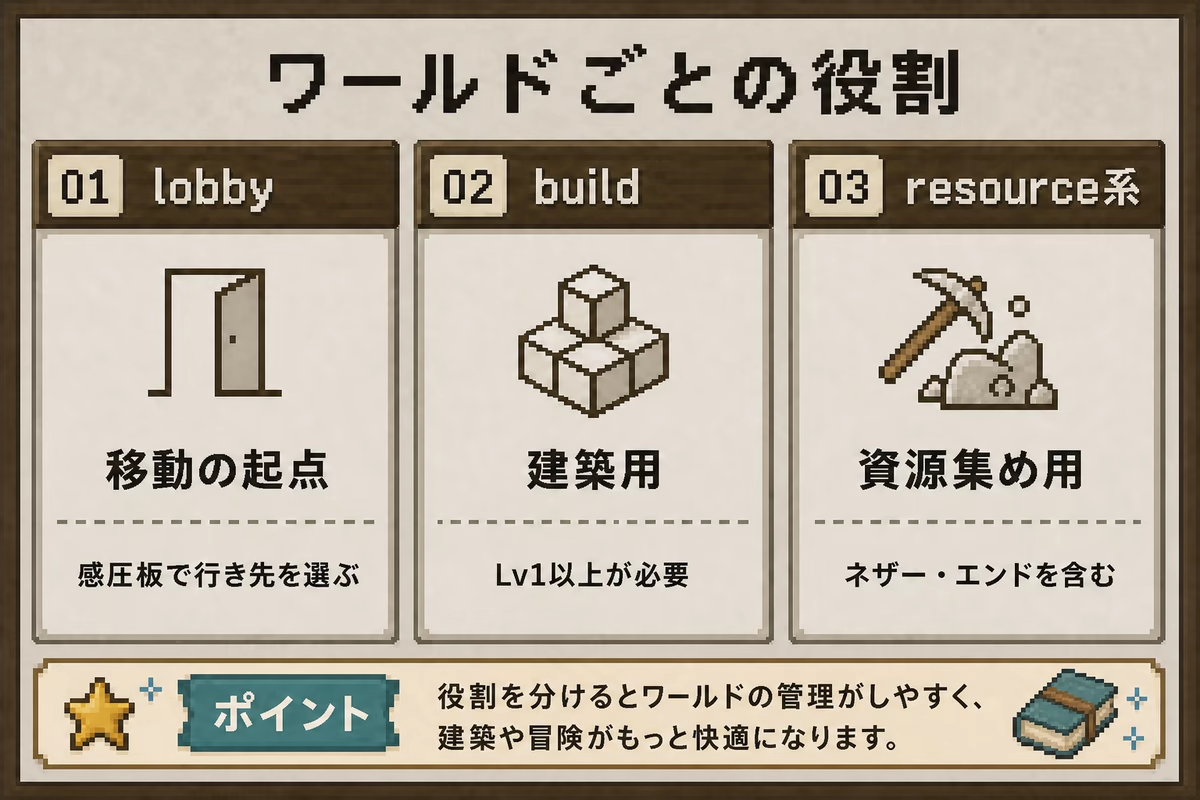
Illustrations and screenshots may show Japanese labels. The text below explains the same features in English.
The server has several worlds.
Some automatically take you to a safe location on first entry or return you to where you last left.
World list
| World | Purpose | Required level | Size, measured from the center |
|---|---|---|---|
| Lobby | Travel hub | Lv0 | 50-block radius |
| Building World | Building | Lv1 | 10,000-block radius |
| Resource World | Gathering resources | Lv0 | 5,000-block radius |
| Resource Server 2 | Gathering resources; regenerated weekly | Lv0 | 5,000-block radius |
| Resource Nether | Gathering Nether resources | Lv1 | 5,000-block radius |
| Resource End | Gathering End resources | Lv1 | 5,000-block radius |
These are the only 6 worlds players can enter.
Their terrain works as follows.
- The lobby is a flat world.
- The Building World has ordinary terrain, but ores are automatically removed from newly generated areas.
- Resource Server 2 has ordinary terrain like the Resource World and is regenerated with new terrain every Sunday morning; see Resource Server 2.
- The Resource Nether and Resource End are created automatically at server startup.
Size indicates approximately how far you can travel outward from a world’s center.
You cannot cross its world border, an invisible boundary. Keep this in mind before choosing a base location.
Entry requirements
Although several destinations are called resource worlds, only the Resource World and Resource Server 2 allow Lv0 players.
The Resource Nether and Resource End require Lv1.
This helps new players avoid losing their belongings by immediately entering dangerous dimensions.
Lv1 requires both 30 minutes of active playtime and 5 advancements.
- Check your level and progress with
/level. - Check completed advancements in Java’s standard advancement screen, for example with L, or with
/advon Bedrock. - Trying to enter a restricted world displays a message. The phone or guide’s Building World button explains that Lv1 requires 30 active minutes and 5 advancements, and directs you to
/level.
See Player levels for all level requirements.
Basic world travel
Normally, travel through the lobby or using the smartphone.
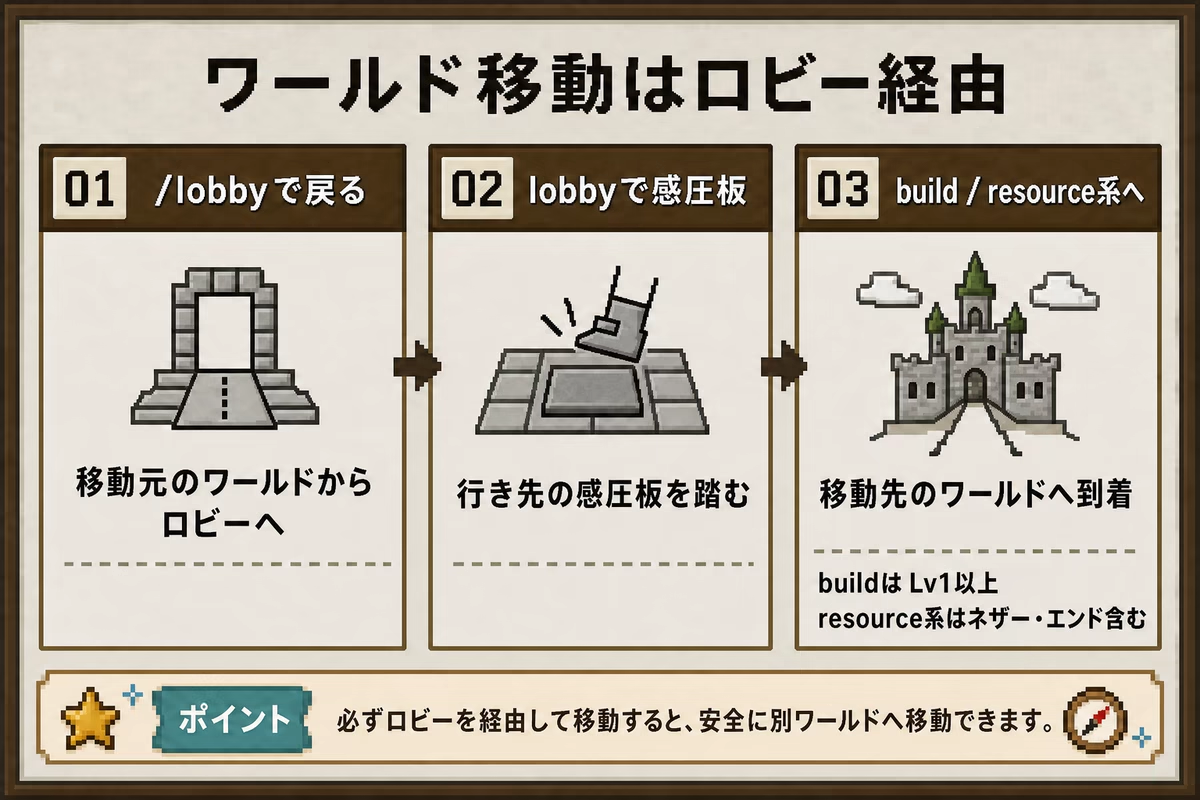
The 2 main methods offer different destinations.
| Method | Destinations | How |
|---|---|---|
Smartphone, /phone or the guide |
Resource World, Resource Server 2, Building World from Lv1 | Open the phone and choose 「その他の機能」 (Other features), then 「移動」 (Travel), or right-click the lobby guide villager |
| Pressure plates | Resource World, Building World from Lv1, Resource Nether from Lv1, Resource End from Lv1 | Step on the plate in the corresponding lobby direction |
The phone’s travel screen has no Resource Nether or Resource End option. Use the lobby plates, or a Nether portal in the Resource World for the Resource Nether.
See Resource Server 2 for its specific route.
Use either command below to return to the lobby’s starting point.
/lobby
/l
For 5 seconds after attacking a monster or taking damage, you count as in combat and cannot return to the lobby.
If you are already in the lobby, the command tells you so.
Why am I in combat when PVP is disabled?
Here, combat means fighting monsters.
Player-versus-player damage is disabled in every world.
Idle players are moved to the lobby
Players outside the lobby who have not acted for at least 10 minutes are automatically moved to the lobby starting point. Checks run once per minute, so the actual move happens 10–11 minutes after the last action.
Chat explains that you were moved because you had not acted for more than 10 minutes. Players already in the lobby are not moved, and idling there does nothing.
What counts as activity
Player actions such as movement, looking around, item use, and chat count for this check.
- Walking into another block
- Changing your view direction
- Jumping
- Sprinting
- Sneaking
- Breaking or placing blocks
- Clicking to use blocks or items
- Attacking
- Using your inventory
- Sending chat messages
- Entering commands
These movements do not count by themselves.
- Being carried by a minecart, boat, horse, or other vehicle
- Moving in water, including being carried by a current
However, other actions such as looking around still count while riding or in water.
This check is separate from level-system active playtime. Walking or looking around alone does not increase that playtime.
After being moved to the lobby
If you were in the Building World, Resource World, or Resource Server 2, returning to the same world restores your previous location. See first and later visits.
Use lobby plates or the phone for the Building World and Resource World. For Resource Server 2, choose 「資源サーバー2へ」 in the phone’s travel menu or enter /mv tp resource2.
The Resource Nether and Resource End do not restore your previous location. Returning from the lobby puts you at their starting points.
If you will be away, you can return to the lobby first with /lobby or /l.
Steps for changing worlds
- Return to the lobby with
/lobbyor/l, or open/phone. - Choose your destination. On the phone, open Other features, then Travel, and choose the Resource World or Building World. You can also open the phone through the guide villager. For pressure plates, use the directions below.
- East: Resource World
- West: Resource Nether, Lv1
- South: Building World, Lv1
- North: Resource End, Lv1
- Check that you have arrived.
You can also use /mv tp resource for the Resource World, /mv tp resource2 for Resource Server 2, or /mv tp build for the Building World. Building World access still requires Lv1.
To visit a player in another world, send /tpa <player>. Their /tpaccept moves you to them. You still need the required level for that world.
If travel fails
| Problem | What to check |
|---|---|
| A pressure plate does not move you | Read the message. If you cannot enter yet, check /level. If travel failed, the arrival point may be blocked; wait and try again or report it with /feedback. |
| You cannot find the guide | /phone opens the same menu from anywhere. |
/lobby does not return you |
Wait until 5 seconds after your latest monster combat. |
Random teleportation: /rtp
Random teleportation finds a safe location within your current world. Enter /rtp, or choose Other features, Travel, then 「ランダム移動」 (Random travel) on the smartphone.
How it works and its limits
RTP has rules for eligible worlds, destination range, and timing.
Supported worlds
It works only in the Resource World, Resource Server 2, Resource Nether, and Resource End. In the lobby or Building World, it displays an unavailable-in-this-world message and charges nothing.
Destination range
Candidates lie within a square extending up to 3,000 blocks along both X and Z from the world’s center at 0,0. Locations where both X and Z are less than 10 blocks from the center are excluded. If no safe location is found, you stay where you are.
Waiting time
There is a 5-second wait between the command and the teleport. Disconnecting or changing worlds cancels it. Walking does not cancel it.
Cooldown
There is no cooldown between uses. Each use still has the 5-second wait.
Cost
RTP is a paid feature with 1 free successful use per week.
First successful use each week
Each player’s first successful use of the week is free. This allowance resets on Sunday morning when the Resource End and Resource Server 2 reset.
Automatic random travel on world entry is separate, costs nothing, and does not consume the weekly free allowance.
Later successful uses
The second and later successful uses in the same week cost 100 Spa Coins each.
Insufficient funds or a failed teleport
You do not move if you lack the required balance. Failed teleports, including failure to find safe footing, are refunded.
Can I use RTP in the Resource Nether or Resource End?
Yes. After arriving there, run /rtp to move to a safe location within that dimension. Range, waiting time, and fees match the Resource World.
Entry itself does not automatically randomize your location; see Resource Nether and Resource End. Run /rtp yourself after arriving if you want to leave the starting area.
Destination selection differs slightly in those dimensions.
Resource Nether
It searches for solid footing and open space below the bedrock roof, at height 120 or lower. It never puts you above the roof. Locations with nearby lava, fire, or magma blocks are avoided.
Resource End
Because the central island is surrounded by void, you land only on an island with solid footing. You may arrive on an outer island far from the center.
If there is no route back, use /lobby or /l. If no suitable island is found, you stay where you are and the fee is refunded.
First and later visits
Your arrival location depends on the world.
Building World and Resource World
Traveling from the lobby behaves as follows.
- Your first Resource World visit automatically teleports you to a random safe location. The Building World does not use random entry; it uses a fixed starting point.
- Returning to either world restores the location where you last left it.
- Your position in either world is also saved when you log out.
Previous locations are tracked separately for each world.
The Building World and Resource World each have their own saved location.
Resource Nether and Resource End
These resource-gathering dimensions both require Lv1.
Unlike the Building World and Resource World, they have neither previous-location restoration nor first-entry random teleportation. Entering from the lobby places you at that world’s starting point. Entering the Resource Nether through a Resource World portal places you at its linked portal.
Check where you arrived and whether the surroundings are safe before moving. In the Nether, you may arrive close to lava.
Resource Server 2
Resource Server 2 is a separate resource-gathering world available from Lv0.
Choose 「資源サーバー2へ」 in the phone’s travel menu, or use this command. It has no lobby pressure plate.
/mv tp resource2If a previous exit location is saved, you return there. Logout positions are saved too.
When you enter from the lobby or Building World with no previous location saved, you are automatically teleported to a random safe location. This covers first visits and the first visit after Sunday’s weekly regeneration.
Direct entry from the Resource World or Nether still uses the starting point if there is no saved location. Explicit destinations, such as a Return Charm or /home, take priority.
Resource Server 2 supports Jobs rewards and /rtp, but not land claims or shop creation. Nether and End portals do not work there. Reach the Resource Nether through the Resource World or the lobby plate.
The Resource End and Resource Server 2 reset weekly
Both worlds are regenerated with new terrain around 04:00 JST every Sunday morning, after the daily backup finishes.
Anything left there is removed
Buildings, placed chests, and chest contents in these 2 worlds are all removed.
Bring your gathered items home before Sunday morning. A /bolt lock does not preserve a chest; the chest and its lock are removed together. Your carried inventory and ender chest contents are not removed.
Players are moved to the lobby for the reset
An in-game announcement precedes regeneration. After 30 seconds, players in the Resource End and Resource Server 2 are moved to the lobby, and everyone online is disconnected.
You cannot connect until the work finishes. When you reconnect afterward, you are in the lobby.
Only these two worlds are regenerated
This weekly regeneration affects only the Resource End and Resource Server 2. The Resource World and Resource Nether are unchanged. Individual chest locks in the Building World and Resource World also remain.
Creeper explosion protection
In the Resource World, Resource Server 2, Resource Nether, and Resource End, creeper explosions do not break blocks or damage non-hostile mobs. The explosion still happens, with sound and blast effects.
Protected mobs include villagers, wandering traders, cows, pigs, tamed wolves and cats, and iron golems.
Charged creepers follow the same rules.
Players still take creeper explosion damage and can die with weak equipment. Hostile mobs such as zombies and skeletons also take damage normally.
The following behavior is unchanged.
- TNT, beds, respawn anchors, and end crystals can still explode, break blocks, and damage mobs.
- Creeper explosions can still destroy item frames, armor stands, paintings, minecarts, boats, and dropped items.
The Building World uses land protection instead. See what land claims protect.
Nether portals
Nether portals work only between the Resource World and Resource Nether.
Build a portal in the Resource World to travel between them.
Portals do not work in the lobby or Building World.
End portals are also disabled. To reach the Resource End, return to the lobby with /lobby or /l and use the northern pressure plate.
Portals are unavailable at Lv0
The Resource Nether requires Lv1, so a Lv0 player cannot pass through a portal even after building one in the Resource World.
A message explains that Resource Nether access starts at Lv1.
Which activities belong where?
- Build in the Building World.
- Gather resources in the Resource World, Resource Server 2, Resource Nether, and Resource End. Resource gathering in the Building World is prohibited.
- PVP is disabled in every world.
- See the server rules for more about claims, machines, and resource gathering.
Paid travel commands: homes
Save a base or frequently visited location as a home to return with a command.
For /rtp pricing and behavior, see random teleportation.
Ordinary players can save up to 2 homes.
Prices
Saving and traveling to homes cost Spa Coins. Check /balance beforehand.
| Action | Command | Price |
|---|---|---|
| Save or update a home | /sethome <name>; omitted name defaults to home |
100 Spa Coins |
| Travel to a home | /home <name>; omission lists homes or travels directly |
2 Spa Coins |
| Delete a home | /delhome <name>; name required |
Free |
Saving or updating a home
Stand where you want the home and enter a command such as these.
- First home:
/sethome home - Second home:
/sethome mine
Choose names you will remember, such as home and mine.
Adding a second home
If you already have one, use a different name for the second.
Updating a location
Using /sethome with an existing home’s name replaces its location. Updates also cost 100 Spa Coins.
Omitting the name
Entering only /sethome uses the name home.
Traveling to a home
Specify the saved home’s name.
- Go to
mine:/home mine - Go to
home:/home home
If you have several homes, /home without a name lists them in chat. If you have only one, it takes you there directly.
Deleting a home
Enter /delhome followed by the name. Deletion is free, and the name cannot be omitted.
- Delete
mine:/delhome mine - Delete
home:/delhome home
Deleting one frees a home slot. If both slots are occupied and you want a differently named home, delete one first.
Deleted homes cannot be restored, and the original 100-Spa-Coin fee is not refunded.
On Java, entering a space after /delhome offers your home names as suggestions.
Returning to a death location: Return Charm
Use a Return Charm to return near where you last died. Buy one from the admin shop, hold it, and right-click. Your belongings remain in your grave for a while, so it can help you reach them quickly.
You can buy it with /shop after dying. See the admin shop’s Return Charm section for conditions and cautions.
Viewing the map in a browser
You can view the worlds in BlueMap, a 3D browser map. No login or running Minecraft client is required.
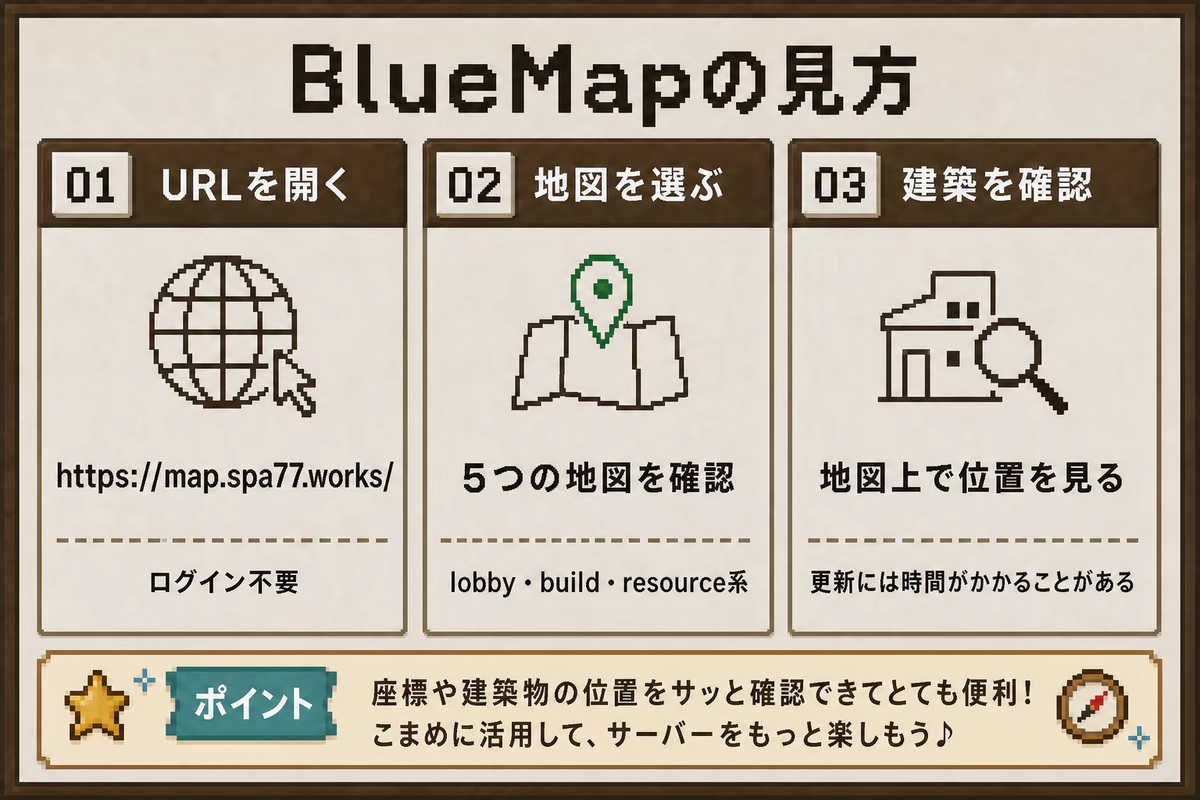
- Choose among 6 maps: Overworld, which is the lobby, Building World, Resource World, Resource Server 2, Resource Nether, and Resource End.
- Drag with a mouse or use touch to move the view; use the wheel or pinch to zoom.
- Newly built structures may take time to appear. If the map looks outdated, wait and reload.
Anyone can view the map
Coordinates, buildings, and online players’ current locations are publicly visible. Assume that hidden bases and private warehouses can be seen too.