 spa77.works SMPEconomy survival
Player guideAuctions
Auctions
Illustrations and screenshots may show Japanese labels. The text below explains the same features in English.
Auctions are for trading individual items without a fixed market price, such as enchanted books or named tools.
Enter /ah to open the auction house from anywhere.
When to use a chest shop instead
Use a shop for everyday items such as stone or food sold at a regular price.
Use an auction for one-of-a-kind items or things whose selling price is uncertain.
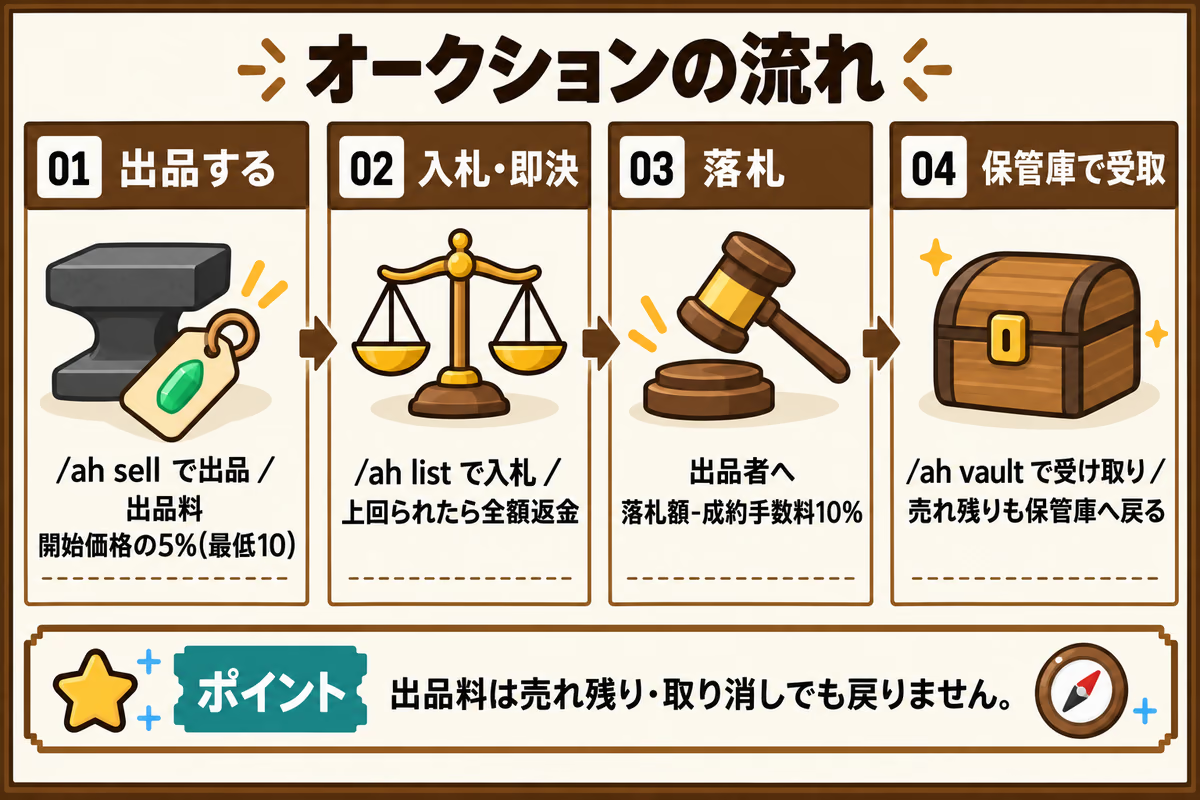
Listing an item
- Hold the item you want to sell and run
/ah sell, or choose 「出品する」 (List an item) from the/ahmenu. - Enter a starting price in chat, from 10 to 100,000 Spa Coins.
- Review the listing and fee, then enter 「はい」 (yes) to confirm.
The default quantity is everything in your hand, with no buyout price and a 24-hour duration.
Neither items nor money move until you enter 「はい」.
Use /ah cancel to stop during entry. Entry is canceled automatically after 120 seconds without input.
Each player can have up to 3 active listings.
Changing quantity, buyout price, or duration
At confirmation, enter 「変更」 (change). You are asked for quantity, buyout price, and duration in that order, then returned to confirmation. If you hold only 1 item, the quantity question is skipped.
This does not let you change the starting price. To change that, enter 「いいえ」 (no) to cancel and start again.
| Field | Rule |
|---|---|
| Quantity | From 1 to the number of items in your hand |
| Buyout price | Must exceed the starting price. Enter 0 or 「なし」 for no buyout. |
| Duration | Enter 6, 12, 24, or 48 hours as a number |
Listing announcements
New listings are announced in global game chat. Listing information, including the seller, item name, quantity, and starting price, is also sent to Discord.
Discord notifications
Notifications have anti-spam controls and sending limits, so not every listing is necessarily announced immediately. Check /ah list in game for the current listings.
Listing and bidding from Discord
Once you have verified your Minecraft account through Discord, you can trade as that linked player in the “オークション取引” channel.
Depositing items to sell
Hold the items in-game and run /ah deposit. This deposits the entire stack in your hand, so split off the quantity you want to sell first.
You can store up to five deposits for listing. Depositing does not list an item for sale. Retrieve anything you decide not to list through /ah vault in-game.
Listing a deposited item
Press “預かり品から出品”, then the item’s “出品” button. Enter whole numbers for the starting price, buyout price, and duration. Submitting the form lists the item with those settings. Use 0 if you do not want a buyout price.
The price and duration rules are the same as for in-game listings. The active-listing limit is shared, and the same fees apply.
Placing a bid
Press the listing’s “入札” button, enter a whole-number bid, and submit it. Use “全件を見る” to browse the other listings.
A bid at or above the buyout price buys the item immediately at the buyout price. You cannot bid through Discord while your loan is overdue.
Collect won items from the vault in-game.
Bidding and buying out
Open /ah list and click a listing to view its details.
Sort listings by ending soon, newest, lowest price, or highest price.
- Choose 「入札する」 (Bid) to enter an amount in chat.
- If a buyout price exists, choose 「即決で買う」 (Buy out) to win immediately.
The minimum bid is the starting price if there are no bids, or the current price plus the minimum increment if someone has already bid.
The minimum increment is the larger of 5% of the current price and 10 Spa Coins.
Your bid is deducted from your balance immediately.
If someone outbids you, the full amount is automatically refunded at once.
Late bids reset the time remaining to 3 minutes
A bid made with less than 3 minutes remaining resets the remaining time to 3 minutes from that bid. It does not add 3 minutes to the original end time. This can happen up to 10 times.
This prevents last-second bids, often called sniping, from ending the auction without a chance to respond.
After the auction ends
- The winner’s items go into their vault, not onto the ground.
- The seller receives the winning amount minus the sale fee.
- If there were no bids, the unsold item returns to the seller’s vault.
Open the vault with /ah vault and click an item to collect it.
Make room in your inventory first. Anything you cannot collect stays in the vault.
Fees
| Fee | Amount | When it is charged |
|---|---|---|
| Listing fee | 5% of starting price, minimum 10 Spa Coins | When you confirm the listing |
| Sale fee | 10% of the winning price | Deducted from the seller’s proceeds when the sale completes |
Both fees are rounded up to the next whole Spa Coin.
For example, 5% of a starting price of 333 Spa Coins is 16.65, so the listing fee is 17 Spa Coins.
Listing fees are not refunded if an item goes unsold or you cancel the listing.
Repeatedly relisting an uncertain item at a high starting price can add up to substantial listing fees.
Canceling a listing
You can cancel a listing from 「自分の出品」 (My listings) only if it has no bids.
Once anyone has bid, you cannot cancel it.
Command reference
| Command | What it opens or does |
|---|---|
/ah |
Main menu; /auction also works |
/ah deposit |
Deposit the whole held stack for listing through Discord |
/ah sell |
Start listing the item in your hand |
/ah list |
Active listings |
/ah my |
Your listings |
/ah bids |
Listings you have bid on |
/ah vault |
Your vault |
/ah cancel |
Cancel the listing or bid you are currently entering |
Common problems
| Problem | What to check |
|---|---|
| You cannot list an item | Hold an item, check that you have fewer than 3 active listings, and use a starting price from 10 to 100,000 Spa Coins. |
| You cannot bid | You cannot bid on your own listing. Meet the current price plus minimum increment, and have enough money. |
| Your item has not arrived | Won items do not drop at your feet. Check /ah vault. |
| You cannot collect from the vault | Make room in your inventory. |
| Your bid has not been refunded | Outbid bids are refunded immediately. You may still be the highest bidder. |
| You cannot cancel a listing | Listings with bids cannot be canceled. |
Completed listing records are deleted after 30 days. Vault contents are not deleted.